Tuesday, May 15, 2012

Is it possible to store view state in server side?

Yes, we can implement server side viewstate.

For this we have to override two virtual methods LoadPageStateFromPersistenceMedium() and SavePageStateToPersistenceMedium() of System.Web.UI.Page (on your aspx page)

However, it is not straightforward, because a user can visit a page in browser, hit the back button to a previous page and push a button (which would require the viewstate for that page). We have to handle such scenarios carefully.

Sample code:


//overriding method of Page class
protected override object LoadPageStateFromPersistenceMedium()
{
    //If server side enabled use it, otherwise use original base class implementation
    if (ConfigurationManager.AppSettings["ServerSideEnabled"].Equals("true"))
    {
        //Your implementation here.
    }
    else
    {
        return base.LoadPageStateFromPersistenceMedium();
    }
}


protected override void SavePageStateToPersistenceMedium(object state)
{
    //If server side enabled use it, otherwise use original base class implementation
    if (ConfigurationManager.AppSettings["ServerSideEnabled"].Equals("true"))
    {
        //Your implementation here.
    }
    else
    {
        base.SavePageStateToPersistenceMedium(state);
    }
}

Few Object Oriented Question

1. Can we call a base class method without creating instance?
Answer :
Its possible If its a static method.
Its possible by inheriting from that class also.
Its possible from derived classes using base keyword.

2. What is Method Overriding? How to override a function in C#?
Answer :
Use the override modifier to modify a method, a property, an indexer, or an event. An override method provides a new implementation of a member inherited from a base class. The method overridden by an override declaration is known as the overridden base method. The overridden base method must have the same signature as the override method.
You cannot override a non-virtual or static method. The overridden base method must be virtual, abstract, or override

3. What’s an abstract class?
Answer :
A class that cannot be instantiated. An abstract class is a class that must be inherited and have the methods overridden. An abstract class is essentially a blueprint for a class without any implementation.

4. When do you absolutely have to declare a class as abstract?
Answer :
1. When the class itself is inherited from an abstract class, but not all base abstract methods have been overridden.
2. When at least one of the methods in the class is abstract.

5. What is an interface class?
Answer :
Interfaces, like classes, define a set of properties, methods, and events. But unlike classes, interfaces do not provide implementation. They are implemented by classes, and defined as separate entities from classes.

6. What happens if you inherit multiple interfaces and they have conflicting method names?
Answer :
It’s up to you to implement the method inside your own class, so implementation is left entirely up to you. This might cause a problem on a higher-level scale if similarly named methods from different interfaces expect different data, but as far as compiler cares it is okay.

7. What’s the difference between an interface and abstract class?
Answer :
In an interface class, all methods are abstract - there is no implementation. In an abstract class some methods can be concrete. In an interface class, no accessibility modifiers are allowed. An abstract class may have accessibility modifiers.

8. How is method overriding different from method overloading?
Answer :
When overriding a method, you change the behavior of the method for the derived class. Overloading a method simply involves having another method with the same name within the class.

9. If a base class has a number of overloaded constructors, and an inheriting class has a number of overloaded constructors; can you enforce a call from an inherited constructor to a specific base constructor?
Answer :
Yes, just place a colon, and then keyword base (parameter list to invoke the appropriate constructor) in the overloaded constructor definition inside the inherited class.

10. What are the different ways a method can be overloaded?
Answer :
Different parameter data types, different number of parameters, different order of parameters.

11. Can you prevent your class from being inherited by another class?
Answer :
Yes. The keyword “sealed” will prevent the class from being inherited.

12. What’s the C# syntax to catch any possible exception?
Answer :
A catch block that catches the exception of type System.Exception. You can also omit the parameter data type in this case and just write catch {}

13. What’s the difference between the System.Array.CopyTo() and System.Array.Clone()?
Answer :
The Clone() method returns a new array (a shallow copy) object containing all the elements in the original array. The CopyTo() method copies the elements into another existing array. Both perform a shallow copy. A shallow copy means the contents (each array element) contains references to the same object as the elements in the original array. A deep copy (which neither of these methods performs) would create a new instance of each element’s object, resulting in a different, yet identacle object.

14. What’s the advantage of using System.Text.StringBuilder over System.String?
Answer :
StringBuilder is more efficient in cases where there is a large amount of string manipulation. Strings are immutable, so each time a string is changed, a new instance in memory is created.

15. What’s the difference between System.String and System.Text.StringBuilder classes?
Answer :
System.String is immutable. System.StringBuilder was designed with the purpose of having a mutable string where a variety of operations can be performed.

16. What does the term immutable mean?
Answer :
The data value may not be changed. Note: The variable value may be changed, but the original immutable data value was discarded and a new data value was created in memory.

Monday, May 14, 2012

Access the base class method with derived class objects (when using shadowing)

When you are using shadowing if you want to access the base class method with derived class objects how can you access it?

First cast the derived class object to base class type and if you call method it invokes base class method.Please note that it works only when derived class method is shadowed.
observe the bold lines below:

public class BaseClass
{
public void Method1()
{
string a = "Base method";
}
}
public class DerivedClass : BaseClass
{
public new void Method1()
{
string a = "Derived Method";
}
}
public class TestApp
{
public static void main()
{
DerivedClass derivedObj = new DerivedClass();
BaseClass obj2 = (BaseClass)derivedObj;
obj2.Method1(); // invokes Baseclass method

}
}

Friday, May 4, 2012

Count total rows in a table

Number of ways to count rows in a table :  

*) select count(*) from LifeEmailQuotesXML

*) select count(1) from LifeEmailQuotesXML
 
*) select sum(1) from LifeEmailQuotesXML

*) select object_name(id), rows from sys.sysindexes where object_name(id) = 'LifeEmailQuotesXML' and indid < 2

*) exec sp_spaceused 'LifeEmailQuotesXML'

*) DBCC CHECKTABLE('LifeEmailQuotesXML')

*) DBCC UPDATEUSAGE ('BimaExpress','LifeEmailQuotesXML') WITH COUNT_ROWS

What are Generations in Garbage Collector?

Generations in the Garbage Collector is a way of enhancing the garbage collection performance. In .NET, all resources are allocated space (memory) from the heap. Objects are automatically freed from the managed heap when they are no longer required by the application.

When objects are no longer being used by the application, the .NET runtime's garbage collector performs the task of collection, to determine the status of the objects. Necessary operations are performed to relieve the memory, in case the object is no longer in use. This is identified by the GC by examining the metadata of the object. For this, the GC has to know the location of the roots that represent the object. Roots are actually the location of the object on the managed heap. There are two types of memory references, strong & weak. When a root references an object, it is said to be a strong reference as the object is being pointed to by application code. The other type of object, that is not being referenced by the application code is called the weak reference, and this may be collected by the GC. However, this may still be accessed by the application code if required. But for the application to access the weakly referenced object, this has to be converted to a strong reference (and note that this has to be done before the GC collects the weakly referenced object).

So what are Generations in the GC? Its a feature of the GC that enhances its performance. There are 3 Generations...0,1,2.

Generation 0 - When an object is initialized, its in generation 0. These are new objects that have never been played around with by the GC. As and when more objects get created, the process of Garbage Collection is invoked by the CLR.
Generation 1 - The objects that survive the garbage collection process are considered to be in generation 1. These are the old objects.
Generation 2 - As more new objects get created and added to the memory, the new objects are added to generation 0, the generation 1 old objects become older, and so are considered to be in generation 2. Generation 2 is the highest level generation in the garbage collection process. Any further garbage collection process occuring causes the level 1 objects promoted to level 2, and the level 2 objects stay in level 2 itself, as this generation level is the highest level.

So what is the importance & use of the generations process? Its actually the priority the GC gives to objects while freeing objects from the heap. During every GC cycle, the objects in the Generation 0 are scanned first -> Followed by Generation 1 and then 2. This is because the generation 0 objects are usually short term objects, that need to be freed. The newer an object, the shorter its life is. The older an object, longer its life is.

This process also helps in categorizing the memory heap as to where the de-allocation needs to be done first and where next.

Thursday, May 3, 2012

Why finalize for cleanup is not suitable?

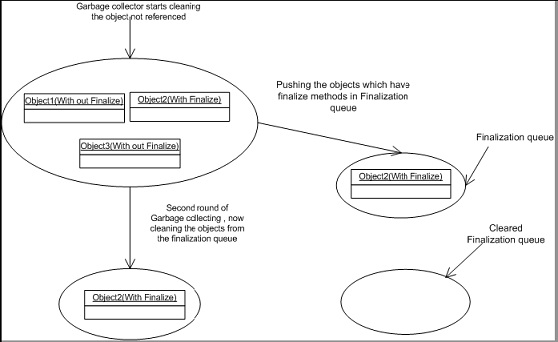
Problem with finalize is that garbage collection has to make two rounds in order to remove objects which have finalize methods.
Below figure will make things clear regarding the two rounds of garbage collection rounds performed for the objects having finalized methods.
g1
Figure: – Garbage collection in actions
In this scenario there are three objects Object1, Object2, and Object3. Object2 has the finalize method overridden and remaining objects do not have the finalize method overridden.
Now when garbage collector runs for the first time it searches for objects whose memory has to free. He can see three objects but only cleans the memory for Object1 and Object3. Object2 it pushes to the finalization queue.
Now garbage collector runs for the second time. He see’s there are no objects to be released and then checks for the finalization queue and at this moment, it clears object2 from the memory.
So if you notice that object2 was released from memory in the second round and not first. That is why the best practice is not to write clean up Non.NET resources in Finalize method rather use the DISPOSE.

Friday, April 27, 2012

Difference between function and stored procedure

Functions or UDFs can contain single or multiple SQL statements depending on its type. A Scalar UDF & Inline UDF can only have a single SELECT statement. And a Multi-Statement UDF can contain a body with multiple SQL statements including SELECTS, IF-ELSE, WHILE loops and DMLs but limited to manipulating table variables only.UDFs return a single Scalar value or a Table variable to the calling SELECT statement.

Stored Procedures can contain a single SQL statement or a group of SQL statements with data flow control logic containing IF-ELSE, WHILE loop constructs, TRY-CATCH, transactions, etc.
SPs are used to return one or many result-sets to its calling application.


Below are some common differences between an Function & Stored Procedure:

Functions:
* Cannot be used to change server configuration
* Cannot have transaction within function 
* Not returning output parameter but returns Table variables 
* Can only be used with SELECT statement, JOINS & APPLY (CROSS & OUTER).
* Cannot execute an SP inside a UDF.
* Can only read data, cannot modify the database.
* Cannot use a Temporary Table, only Table Variables can be used.
* Cannot use a Dynamic SQL inside a UDF.
* Can JOIN a UDF in a SELECT statement.
* Cannot be used with XML FOR clause.
* Can be used to create Constraints while creating a table.
* Cannot execute some non-deterministic built-in functions, like GETDATE().

Stored Procedures:
* Have to use EXEC or EXECUTE, cannot be used with SELECT statement.
* Can create table but won’t return Table Variables
* Cannot JOIN a SP in a SELECT statement.
* Can be used to read and modify data.
* Can use Table Variables as well as Temporary Tables inside an SP.
* Can use transactions inside (BEGIN TRANSACTION, COMMIT, ROLLBACK) an SP.
* Can use a UDF inside a SP in SELECT statement.
* Can create and use Dynamic SQL.
* Can use used with XML FOR clause.
* Cannot be used to create constraints while creating a table.
* Can execute all kinds of functions, be it deterministic or non-deterministic.

Wednesday, December 14, 2011

What is the difference between Web Farm and Web Garden ?

I have been asked this question many times by different readers of my blog. They wanted to know about the fundamentals of Web Farms and Web Garden . In this blog post  I am going to explain the what is the exact difference between web farm and web garden, what are the advantages and disadvantages of using them. I have also described how to create web garden in different version of IIS.
Overview :
Visual Studio having its own integrated ASP.NET engine which is used to run the ASP.NET Web application from Visual Studio. ASP.NET Development Server  is responsible for execute all the request and response from client. Now after the end of development, when you want to host the site on some server to allow other peoples to access, concept of web servers comes in between.  A web server is responsible for  provide the response for all the requests that are coming from clients. Below diagram showing the typical deployment structure of a ASP.NET Web application with a single IIS.
2 Clients request for resources and IIS Process the request and send back to clients.
Web Farm :
This is the case, where you have only one web server and multiple clients requesting for the resources from the same server. But when there is huge numbers of  incoming traffic for your web sites, one standalone server is not sufficient to process the request.  You may need to use multiple server to host the application and divide the traffic among them.  This is called “Web Farm” . So when you are hosting your single web site on multiple web server over load balancer called “Web Farm”. Below diagram showing the over all representation of Web Farms.
 Web Farms
In general web farm architecture, a single application is hosted on multiple IIS Server and those are connected with the VIP ( Virtual IP ) with Load Balancer. Load Balancer IP’s exposed to external worlds to access. So whenever some request will come to server from clients, it will first hit the Load Balancer, then based on the traffic on each server LB distributed the request to corresponding web server.  These web server may share same DB server or may be they can use replicated server in the back end.
So, In a single statement, When we host a web application over multiple web server to distributed the load among them  is called Web Farm.
Web Garden :
Now, let’s have a look, what is Web Garden ?  Both the terms  sounds same,  but they are totally different with each other.  Before starting with Web Garden, I hope you have fundamental idea of what is Application Pool and what is Worker Process. 
Just to recall,  When we are talking about requesting processing with in IIS, Worker Process (w3wp.exe ) takes care all of these. Worker Process runs the ASP.Net application in IIS. All the ASP.Net functionality inside IIS  runs under the scope of worker process. Worker Process is responsible for handling all kind of request, response, session data, cache data.  Application Pool is the container of worker process. Application pools is used to separate sets of IIS worker processes and enables a better security, reliability, and availability for any web application.
apppoolsNow, by default each and every Application pool contains a single worker process. Application which contains the multiple worker process called “Web Garden”. Below is the typical diagram for a web garden application.
WebGarden BasicIn the above diagram you can see, on of the application containing the  multiple worker process, which is now a web garden.
So, a Web application hosted on multiple server and access based on the load on servers is called Web Farms and When a single Application pool contain multiple Worker process is called web garden.
Create Web Garden in IIS 6 and IIS 7
Now, I am going to show how you can change the Number of Worker process In both IIS 6 and IIS 7.  For IIS 6,  Right Click on Application Pool > Properties > Goto  Performance Tab.
WebGardenIIS6
In the “Performance Tab” Section you would have one option called “Web Garden” where worker process sets to “1”, you can set the number of worker process that you required.
For IIS 7, Right Click on Application Pool > Go To Advance Settings > In Process Model section, you will have “Maximum Worker Processes” . You can change it more than 1 to make it as web garden.
WebGardenIIS7
In the above image you can also check the definition of Web Garden also.


Advantages of Web Farm and Web Garden :
Now, let’s have a look in to the advantages of both the Web farms and Web Garden.
Advantages of Web Farm
  • It provides high availability. If any of the server in the farm goes down, Load balancer can redirects the requests to other servers.
  • Provides high performance response for client requests.
  • Provides Better scalability of the web application and reduce the failure of application.
  • Session and other resource can be stored in a centralized location to access by the all server.
Advantages of Web Garden:
  • provides better application availability by sharing request between multiple worker process.
  • Web garden use processor affinity where application can swapped out based on preference and tag setting.
  • Less consumption of physical space for web garden configuration.
How to manage session in Web Farm Mode ?
While using session, requests are distributed among different servers. By default session mode is set to In Proc where session data stored inside worker process memory. But, In Web farm mode we can share the session among all the server using a single session store location my making it Out proc (State Server or SQL Server Mode). So, if some of the server goes down and request transferred to the other server by the Load balancer session data should be available for that request.
sessionWebfarmIn the above diagram,  you can see we can both the IIS server sharing the same session data which is stored in out of worker process.
How to manage session in Web Garden Mode ?
When we are using Web garden where request is being taking care by different worker process we have to make the session mode as out process session mode as described earlier. For Web Garden we have configure the out process with in same server but for different worker process.
webgardenSession2
While using Web garden with your application you need do couple of configuration settings in web.config in <process Model> section where you need to set certain properties like cpuMask, RequestLimit, webGarden, ClientConnectCheck etc.
Summary : When we host a web application over multiple web server to distributed the load among them  is called Web Farm and when One application having multiple worker worker process called Web garden.

Tuesday, December 13, 2011

Handling Division By Zero Scenarios in SQL using NULLIF


Sometimes it is inevitable to encounter scenarios that will give division by zero errors


DECLARE @dividend INT
DECLARE @divisor INT
SET @dividend = 1
SET @divisor = 0
SELECT @dividend/@divisor
/*
Error:
Msg 8134, Level 16, State 1, Line 7
Divide by zero error encountered.
*/
What you can do is you can code around it, so your users and your app do not get this error.

Alternative 1: NULLIF (preferred)

The NULLIF built in function returns a NULL if the two parameters are equal. In our case, we want to check if the divisor is zero.


DECLARE @dividend INT
DECLARE @divisor INT
SET @dividend = 1
SET @divisor = 0
SELECT @dividend/NULLIF(@divisor,0)
/*
Returns NULL
*/
Alternatively, instead of NULL, you may want to display just 0


SELECT ISNULL(@dividend/NULLIF(@divisor,0),0)
/*
Returns NULL, no error
*/

Alternative 2: CASE

You can also use CASE to drive what values you want to show if the divisor. The downside to this approach is your code can get really lengthy right away by having multiple CASE statements.


SELECT
    CASE @divisor
       WHEN 0 THEN 0
       ELSE @dividend/NULLIF(@divisor,0)
    END
/*
Returns 0, no error
*/

Alternative 3: IF/ELSE

You can also use IF/ELSE. However this means you cannot just have one SELECT statement. This needs to be in a script, a stored proc, or UDF.


IF @divisor = 0
BEGIN
   SELECT 0
END
ELSE BEGIN
   SELECT @dividend/@divisor
END
/*
Returns 0, no error
*/

Tuesday, December 6, 2011

What's the difference between a Debug vs Release Build?


When you compile your application in release mode debug information is not generated and this is the option normally used when you want to deploy your application to client.debug mode is heavy since debugging info gets generated and is used while development to find out error in your code.
When we are moving code to production then we make the mode as Release. Because there no debug is required and the execution also very fast in this mode due to the .pdb file formation will not happens.

Debug build
1. Basically this for developer
2. Complier code optimization is OFF

Release build
1. Basically this for Client to whom you want to distribute the application
2. Complier code optimization is ON