Wednesday, May 16, 2012

System databases in sql server

master database

The Master database is the heart and soul of SQL Server. It basically records all the system level information. Every instance of SQL Server will have an independent Master database; as it captures instance level configuration information. The information which is captured in the Master database includes SQL Server instance level configurations, linked server configurations, SQL Server Logins, Service Broker Endpoints, System Level Stored Procedures, and System level Functions etc. The system and user databases related information such as name and location for user and system database are captured in Master database.

If master database is corrupted or if it is not available then the SQL Server Service will not start. In SQL Server 2005 and later versions the system objects are stored in Resource Database rather than in Master Database. The Master database is created using Simple Recovery Model.

msdb database


SQL Server Agent uses MSDB database to store information related to the configuration of SQL Server Agent Jobs, Job schedules, Alerts, Operators etc. MSDB also stores information related to configuration of Service Broker, Log Shipping, database backups and restore information, Maintenance Plan Configuration, Configuration of Database Mail, Policy Bases Information of SQL Server 2008 etc. 

If the MSDB database is corrupted or damaged then scheduling information used by SQL Server Agent will be lost. This will result in the failure of all scheduled activities.

model database

The Model database is basically used as a template when creating databases in SQL Server. Basically SQL Server takes a copy of Model database whenever a user tries to create a new database in SQL Server. This also means that if a user creates any tables, stored procedures, user defined data types or user defined functions within a Model database; then those objects will be available in every newly created database on that particular instance of SQL Server.

If the Model database is damaged or corrupted then SQL Server Service will not start up as it will not be able to create the tempdb database.

Resource database

The Resource database is a read only, hidden system database that contains all the SQL Server system objects such as sys.objects which are physically available only in the Resource database, even though they logically appear in the SYS schema of every database. The Resource Database does not contain any user data or any user metadata. By design, the Resource database is not visible under SQL Server Management Studio’s Object Explorer | Databases | System Databases Node.

The DBA shouldn’t rename or move the Resource Database file. If the files are renamed or moved from their respective locations then SQL Server will not start. The other important thing to be considered is not to put the Resource Database files in a compressed or encrypted NTFS file system folders as it will hinder the performance and will also possibly  prevent upgrades.

tempdb database

In SQL Server, TempDB database is recreated every time SQL Server Service is restarted. This also means that the some of the settings of Model database are also used when TempDB is created. Is a workspace for holding temporary objects or intermediate result sets.

Concept of polymorphism


What is Polymorphism?

  • Polymorphism means many forms.
  1. It has the ability for classes to provide different implementations of methods that are called through the same name.
  2. It allows you to invoke methods of derived class through base class reference during runtime.
    • Polymorphism is one of the primary characteristics (concept) of object-oriented programming.
    • Poly means many and morph means form. Thus, polymorphism refers to being able to use many forms of a type without regard to the details.
    • Polymorphism is the characteristic of being able to assign a different meaning specifically, to allow an entity such as a variable, a function, or an object to have more than one form.
    • Polymorphism is the ability to process objects differently depending on their data types.
    • Polymorphism is the ability to redefine methods for derived classes.

    Types of Polymorphism

    • Compile time Polymorphism
    • Run time Polymorphism

    Compile time Polymorphism

    • Compile time Polymorphism also known as method overloading
    • Method overloading means having two or more methods with the same name but with different signatures
    • Example of Compile time polymorphism

     Run time Polymorphism

    • Run time Polymorphism also known as method overriding
    • Method overriding means having two or more methods with the same name , same signature but with different implementation

    Example of Run time Polymorphism


    You can find source code at the bottom of this article.


    What is polymorphism? Poly means many. So how can we take this definition in .NET context. Well we can apply this to class's ability to share the same methods (actions) but implement them differently.
    Suppose we have a method in a class to add numbers,
    1 public class calculation
    2 {
    3 public int add(int x, int y)
    4 {
    5   return x+y;
    6 }
    7 }

    So to perform addition of three numbers, we need similar add method but with different parameter
    01 public class calculation
    02 {
    03 public int add(int x, int y)
    04 {
    05   return x+y;
    06 }
    07  public int add(int x, int y,int z)
    08 {
    09   return x+y+z;
    10 }
    11 }

    So we can that class is sharing the same methods (actions) but implement them differently.
    Now this is an example when we are sharing method name and implementing them differently, let's take a scenario where implementation is in some derived class.
    For instance, say we create a class called Shape and this class has a method called .Area () which calculates area. Then we create two subclasses, using inheritance, of this Shape class. One called Square, the other called Circle. Now obviously a square and circle are two entirely different shapes, yet both classes have the .Area() method. When the Square.Area() method is called it will calculate area of  a square. When the Circle.Area() method is called, it will calculate area of a circle. So both classes can use the same methods but implement them differently.

    Now let's dive little deeper and understand what we discussed above in more technical terms.

    1) Static or Compile time Polymorphism


    Which method is to be called is decided at compile-time only. Method Overloading is an example of this. Method overloading is a concept where we use the same method name many times in the same class, but different parameters. Depending on the parameters we pass, it is decided at compile-time only. The same method name with the same parameters is an error and it is a case of duplication of methods which c# does not permit. In Static Polymorphism decision is taken at compile time.

    public Class StaticDemo
    {
      public void display(int x)
     {
      Console.WriteLine("Area of a Square:"+x*x);
     }
      public void display(int x, int y)
     {
      Console.WriteLine("Area of a Square:"+x*y);
     }
     public static void main(String args[])
     {
      StaticDemo spd=new StaticDemo();
      Spd.display(5);
      Spd.display(10,3);
     }
    }


    2) Dynamic or Runtime Polymorphism.


    Run time Polymorphism also known as method overriding. In this Mechanism by which a call to an overridden function is resolved at a Run-Time (not at Compile-time) if a base Class contains a method that is overridden. Method overriding means having two or more methods with the same name, same signature but with different implementation. In this process, an overridden method is called through the reference variable of a superclass, the determination of the method to be called is based on the object being referred to by reference variable.
    01 Class BaseClass
    02 {
    03   Public void show ()
    04  
    05   Console.WriteLine("From base class show method");
    06   }
    07 }
    08 Public Class DynamicDemo : BaseClass
    09 {
    10   Public void show()
    11   {
    12   Console.WriteLine("From Derived Class show method");
    13   }
    14   Public static void main(String args[])
    15   {
    16   DynamicDemo dpd=new DynamicDemo ();
    17   Dpd.show();
    18    
    19   }
    20 }
    Here memory allocation will be at the run time for that particular method.

    What is Virtual Function: They implement the concept of polymorphism are the same as in C#, except that you use the override keyword with the virtual function implementation in the child class. The parent class uses the same virtual keyword. Every class that overrides the virtual method will use
    the override keyword.
    Why to use them:

    1)It is not compulsory to mark the derived/child class function with Override KeyWord while base/parent class contains a virtual method
    2)Virtual methods allow subclasses to provide their own implementation of that method using the override keyword

    3)Virtual methods can't be declared as private.

    4)You are not required to declare a method as virtual. But, if you don't, and you derive from the class, and your derived class has a method by the same name and signature, you'll get a warning that you are hiding a parent's method

    5)A virtual property or method has an implementation in the base class, and can be overriden in the derived classes.

    6)
    We will get a warning if we won't use Virtual/New keyword.

    7)Instead of Virtual we can use New Keyword
    01 class A
    02 {
    03 public void M()
    04 {
    05 Console.WriteLine("A.M() being called");
    06 }
    07
    08 public virtual void N()
    09 {
    10 Console.WriteLine("A.N() being called");
    11 }
    12 }
    13
    14 class B : A
    15 {
    16 public new void M()
    17 {
    18 Console.WriteLine("B.M() being called");
    19 }
    20
    21 public override void N()
    22 {
    23 Console.WriteLine("B.N() being called");
    24 }
    25 }


    say

    A a = new B();

    a.M();
    a.N();


    The results would be

    A.M() being called
    B.N() being called

    Override Keyword: method overriding is modifying or replacing the implementation of the parent class with a new one. Parent classes with virtual or abstract members allow derived classes to override them.
    01 class Shape
    02 {
    03   public virtual void Draw()
    04   {
    05   Console.WriteLine("Shape.Draw")  ;
    06   }
    07 }
    08
    09 class Rectangle : Shape
    10
    11 {
    12   public override void Draw()
    13   {
    14   Console.WriteLine("Rectangle.Draw");
    15   }
    16 }

    Asp.net frequently asked question


    What is the difference between a DLL and an EXE?
    In .NET, an assembly may become a DLL or an EXE. Yet, there is a major underlying difference between the two.
    An
    EXE is an executable file, that may run on its own. Its independant. Where as a DLL is a Dynamic Link Library, that binds to an exe, or another DLL at runtime.

    A DLL has an exposed interface, through which members of the assembly may be accessed by those objects that require it.
    A
    DLL runs in tandem with the application space in memory, as the application references it. Whereas an EXE is independant, and runs as an independant process.


    What is the difference between a Thread and Process?
    A process is a collection of virtual memory space, code, data, and system resources. A thread is code that is to be serially executed within a process. A processor executes threads, not processes, so each application has at least one process, and a process always has at least one thread of execution, known as the primary thread. A process can have multiple threads in addition to the primary thread. Prior to the introduction of multiple threads of execution, applications were all designed to run on a single thread of execution.

    When a thread begins to execute, it continues until it is killed or until it is interrupted by a thread with higher priority (by a user action or the kernel’s thread scheduler). Each thread can run separate sections of code, or multiple threads can execute the same section of code. Threads executing the same block of code maintain separate stacks. Each thread in a process shares that process’s global variables and resources.


    What is the difference between Authorization and Authentication?
    Both Authentication and Authorization are concepts of providing permission to users to maintain different levels of security, as per the application requirement.

    Authentication is the mechanism whereby systems may securely identify their users. Authentication systems depend on some unique bit of information known only to the individual being authenticated and the authentication system.

    Authorization is the mechanism by which a system determines what level of access a particular authenticated user should have to secured resources controlled by the system.

    When a user logs on to an application/system, the user is first Authenticated, and then Authorized.

    ASP.NET has 3 ways to Authenticate a user:
    1) Forms Authentication
    2) Windows Authentication
    3) Passport Authentication (This is obsolete in .NET 2.0)
    The 4th way is "None" (means no authentication)

    The Authentication Provider performs the task of verifying the credentials of the user ans decides whether a user is authenticated or not. The authentication may be set using the web.config file.

    Windows Authentication provider is the default authentication provider for ASP.NET applications. When a user using this authentication logs in to an application, the credentials are matched with the Windows domain through IIS.

    There are 4 types of Windows Authentication methods:
    1) Anonymous Authentication - IIS allows any user
    2) Basic Authentication - A windows username and password has to be sent across the network (in plain text format, hence not very secure).
    3) Digest Authentication - Same as Basic Authentication, but the credentials are encrypted. Works only on IE 5 or above
    4) Integrated Windows Authentication - Relies on Kerberos technology, with strong credential encryption

    Forms Authentication - This authentication relies on code written by a developer, where credentials are matched against a database. Credentials are entered on web forms, and are matched with the database table that contains the user information.

    Authorization in .NET - There are two types:

    FileAuthorization - this depends on the NTFS system for granting permission
    UrlAuthorization - Authorization rules may be explicitly specified in web.config for different web URLs.
    What is the difference between Server.Transfer and Server.Execute?
    Both Server.Transfer and Server.Execute were introduced in Classic ASP 3.0 (and still work in ASP.NET).

    When Server.Execute is used, a URL is passed to it as a parameter, and the control moves to this new page. Execution of code happens on the new page. Once code execution gets over, the control returns to the initial page, just after where it was called. However, in the case of Server.Transfer, it works very much the same, the difference being the execution stops at the new page itself (means the control is'nt returned to the calling page).

    In both the cases, the URL in the browser remains the first page url (does'nt refresh to the new page URL) as the browser is'nt requested to do so.


    What is the difference between Server.Transfer and Response.Redirect?
    Both "Server" and "Response" are objects of ASP.NET. Server.Transfer and Response.Redirect both are used to transfer a user from one page to another. But there is an underlying difference.
    //Usage of Server.Transfer & Response.Redirect
    Server.Transfer("Page2.aspx");
    Response.Redirect("Page2.aspx");
    The Response.Redirect statement sends a command back to the browser to request the next page from the server. This extra round-trip is often inefficient and unnecessary, but this established standard works very well. By the time Page2 is requested, Page1 has been flushed from the server’s memory and no information can be retrieved about it unless the developer explicitly saved the information using some technique like session, cookie, application, cache etc.

    The more efficient Server.Transfer method simply renders the next page to the browser without an extra round trip. Variables can stay in scope and Page2 can read properties directly from Page1 because it’s still in memory. This technique would be ideal if it wasn’t for the fact that the browser is never notified that the page has changed. Therefore, the address bar in the browser will still show “Page1.aspx” even though the Server.Transfer statement actually caused Page2.aspx to be rendered instead. This may occasionally be a good thing from a security perspective, it often causes problems related to the browser being out of touch with the server. Say, the user reloads the page, the browser will request Page1.aspx instead of the true page (Page2.aspx) that they were viewing. In most cases, Response.Redirect and Server.Transfer can be used interchangeably. But in some cases, efficiency or usability may be the deciding factor in choosing.


    What is the difference between Trace and Debug?
    Trace and Debug - There are two main classes that deal with tracing - Debug and Trace. They both work in a similar way - the difference is that tracing from the Debug class only works in builds that have the DEBUG symbol defined, whereas tracing from the Trace class only works in builds that have the TRACE symbol defined. Typically this means that you should use System.Diagnostics.Trace.WriteLine for tracing that you want to work in debug and release builds, and System.Diagnostics.Debug.WriteLine for tracing that you want to work only in debug builds.

    Tracing is actually the process of collecting information about the program's execution. Debugging is the process of finding & fixing errors in our program. Tracing is the ability of an application to generate information about its own execution. The idea is that subsequent analysis of this information may help us understand why a part of the application is not behaving as it should and allow identification of the source of the error.

    We shall look at two different ways of implementing tracing in .NET via the System.Web.TraceContext class via the System.Diagnostics.Trace and System.Diagnostics.Debug classes. Tracing can be thought of as a better alternative to the response.writes we used to put in our classic ASP3.0 code to help debug pages.

    If we set the Tracing attribute of the Page Directive to True, then Tracing is enabled. The output is appended in the web form output. Messeges can be displayed in the Trace output using Trace.Warn & Trace.Write.

    NOTE The only difference between Trace.Warn & Trace.Write is that the former has output in red color. If the trace is false, there is another way to enable tracing. This is done through the application level. We can use the web.config file and set the trace attribute to true. Here we can set <trace enabled=false .../>

    Note that the Page Directive Trace attribute has precedence over th application level trace attribute of web.config. While using application level tracing, we can view the trace output in the trace.axd file of the project.


    What is the difference between a Public Assembly and a Private Assembly?
    An assembly is the basic building block in .NET. It is the compiled format of a class, that contains Metadata, Manisfest & Intermediate Language code.

    An assembly may be either Public or Private. A public assembly means the same as Shared Assembly.

    Private Assembly - This type of assembly is used by a single application. It is stored in the application's directory or the applications sub-directory. There is no version constraint in a private assembly.

    Shared Assembly or Public Assembly - A shared assembly has version constraint. It is stored in the Global Assembly Cache (GAC). GAC is a repository of shared assemblies maintained by the .NET runtime. It is located at C:\Windows\Assembly OR C:\Winnt\Assembly. The shared assemblies may be used by many applications. To make an assembly a shared assembly, it has to be strongly named. In order to share an assembly with many applications, it must have a strong name.

    A Strong Name assembly is an assembly that has its own identity, through its version and uniqueness.

    In order to convert a private assembly to a shared assembly, i.e. to create a strongly named assembly, follow the steps below...

    1) Create a strong key using the sn.exe tool. This is used to created a cryptographic key pair. The key pair that is generated by the Strong Name tool can be kept in a file or we can store it our your local machine's Crytographic Service Provider (CSP). For this, goto the .NET command interpreter, and type the following...
    sn -k C:\samplekey.snk
    This will create a strong key and save it to the location C:\samplekey.snk 2) If the key is stored in a file, just like we have done above, we use the attribute AssemblyKeyFileAttribute. This belongs to the namespace System.Reflection.AssemblyKeyFileAttribute. If the key was in the CSP, we would make use of System.Reflection.AssemblyKeyNameAttribute.

    Go to the assemblyinfo.vb file of your project. Open this file. Make the following changes in this file...
    <assembly: assemblykeyfileattribute("C:\samplekey.snk")>

    We may write this in our code as well, like this...

    Imports System.Reflection
    <assembly: assemblykeyfileattribute("C:\samplekey.snk")>
    Namespace StrongName
     Public class Sample
     End Class
    End Namespace
    3) Build your project. Your assembly is now strongly named.
    Installing the Shared assembly in GAC...
    Go to .NET command interpreter, use the tool gacutil.exe
    Type the following...
    gacutil /i sampleclass.dll
    To uninstall it, use... gacutil /u sampleclass.dll. Visual Studio.NET provides a GUI tool for viewing all shared assemblies in the GAC.

    Q) Which exception will catch first and what about finally statement?

    try
    {
        int b = 0;
        int c = 10 / b;
    }
    catch (Exception e)
    {
    }
    catch (DivideByZeroException ae)
    {
    }
    finally
    {
    }

    Ans)
    Multiple catch blocks are evaluated from top to bottom, but only one catch block is executed for each exception thrown. The order of your catch blocks is important because .NET will go to the first catch block that is polymorphically compatible with the thrown exception. It is important to place catch blocks with the most specific — most derived — exception classes first.

    In your example, the 1st catch is type of Exception of which is base class for all exceptions and thereby polymorphically compatible with all thrown exceptions. so 2nd catch never can get execute.

    And regarding finally block, it always executes after the try and catch blocks execute. A finally block is always executed, regardless of whether an exception is thrown or whether a catch block matching the exception type is found.

    Primary key without clustered index

    There are three methods by which we can achieve this.

    Method 1:

    Using this method we can specify it while creating the table schema itself.

    Create Table tblTest
    (
    Field1 int Identity not null primary key nonclustered,
    Field2 varchar(30),
    Field3 int null
    )
    Go

    Method 2:

    Using this method also we could specify it while creating the table schema. It just depends on your preference.

    Create Table tblTest
    (
    Field1 int Identity not null,
    Field2 varchar(30),
    Field3 int null
    Constraint pk_parent primary key nonclustered (Field1)
    )
    Go

    Method 3:

    If at all you already have a table which have a clustered index on a PK field then you might want to opt for this method.

    Step 1: Find the contraint name

    sp_helpconstraint tblTest

    /*
    This way we could find out the constraint name.
     Lets assume that our constraint name is PK_tblTest_Name
    */

    Step 2: First drop the existing constaint

    Alter table tblTest drop constraint PK_tblTest_Name

    Step 3: Add the new nonclustered index to that field now

    Alter table tblTest add constraint PK_parent1 primary key nonclustered (Field1)

    Tuesday, May 15, 2012

    Is it possible to store view state in server side?

    Yes, we can implement server side viewstate.

    For this we have to override two virtual methods LoadPageStateFromPersistenceMedium() and SavePageStateToPersistenceMedium() of System.Web.UI.Page (on your aspx page)

    However, it is not straightforward, because a user can visit a page in browser, hit the back button to a previous page and push a button (which would require the viewstate for that page). We have to handle such scenarios carefully.

    Sample code:


    //overriding method of Page class
    protected override object LoadPageStateFromPersistenceMedium()
    {
        //If server side enabled use it, otherwise use original base class implementation
        if (ConfigurationManager.AppSettings["ServerSideEnabled"].Equals("true"))
        {
            //Your implementation here.
        }
        else
        {
            return base.LoadPageStateFromPersistenceMedium();
        }
    }


    protected override void SavePageStateToPersistenceMedium(object state)
    {
        //If server side enabled use it, otherwise use original base class implementation
        if (ConfigurationManager.AppSettings["ServerSideEnabled"].Equals("true"))
        {
            //Your implementation here.
        }
        else
        {
            base.SavePageStateToPersistenceMedium(state);
        }
    }

    Few Object Oriented Question

    1. Can we call a base class method without creating instance?
    Answer :
    Its possible If its a static method.
    Its possible by inheriting from that class also.
    Its possible from derived classes using base keyword.

    2. What is Method Overriding? How to override a function in C#?
    Answer :
    Use the override modifier to modify a method, a property, an indexer, or an event. An override method provides a new implementation of a member inherited from a base class. The method overridden by an override declaration is known as the overridden base method. The overridden base method must have the same signature as the override method.
    You cannot override a non-virtual or static method. The overridden base method must be virtual, abstract, or override

    3. What’s an abstract class?
    Answer :
    A class that cannot be instantiated. An abstract class is a class that must be inherited and have the methods overridden. An abstract class is essentially a blueprint for a class without any implementation.

    4. When do you absolutely have to declare a class as abstract?
    Answer :
    1. When the class itself is inherited from an abstract class, but not all base abstract methods have been overridden.
    2. When at least one of the methods in the class is abstract.

    5. What is an interface class?
    Answer :
    Interfaces, like classes, define a set of properties, methods, and events. But unlike classes, interfaces do not provide implementation. They are implemented by classes, and defined as separate entities from classes.

    6. What happens if you inherit multiple interfaces and they have conflicting method names?
    Answer :
    It’s up to you to implement the method inside your own class, so implementation is left entirely up to you. This might cause a problem on a higher-level scale if similarly named methods from different interfaces expect different data, but as far as compiler cares it is okay.

    7. What’s the difference between an interface and abstract class?
    Answer :
    In an interface class, all methods are abstract - there is no implementation. In an abstract class some methods can be concrete. In an interface class, no accessibility modifiers are allowed. An abstract class may have accessibility modifiers.

    8. How is method overriding different from method overloading?
    Answer :
    When overriding a method, you change the behavior of the method for the derived class. Overloading a method simply involves having another method with the same name within the class.

    9. If a base class has a number of overloaded constructors, and an inheriting class has a number of overloaded constructors; can you enforce a call from an inherited constructor to a specific base constructor?
    Answer :
    Yes, just place a colon, and then keyword base (parameter list to invoke the appropriate constructor) in the overloaded constructor definition inside the inherited class.

    10. What are the different ways a method can be overloaded?
    Answer :
    Different parameter data types, different number of parameters, different order of parameters.

    11. Can you prevent your class from being inherited by another class?
    Answer :
    Yes. The keyword “sealed” will prevent the class from being inherited.

    12. What’s the C# syntax to catch any possible exception?
    Answer :
    A catch block that catches the exception of type System.Exception. You can also omit the parameter data type in this case and just write catch {}

    13. What’s the difference between the System.Array.CopyTo() and System.Array.Clone()?
    Answer :
    The Clone() method returns a new array (a shallow copy) object containing all the elements in the original array. The CopyTo() method copies the elements into another existing array. Both perform a shallow copy. A shallow copy means the contents (each array element) contains references to the same object as the elements in the original array. A deep copy (which neither of these methods performs) would create a new instance of each element’s object, resulting in a different, yet identacle object.

    14. What’s the advantage of using System.Text.StringBuilder over System.String?
    Answer :
    StringBuilder is more efficient in cases where there is a large amount of string manipulation. Strings are immutable, so each time a string is changed, a new instance in memory is created.

    15. What’s the difference between System.String and System.Text.StringBuilder classes?
    Answer :
    System.String is immutable. System.StringBuilder was designed with the purpose of having a mutable string where a variety of operations can be performed.

    16. What does the term immutable mean?
    Answer :
    The data value may not be changed. Note: The variable value may be changed, but the original immutable data value was discarded and a new data value was created in memory.

    Monday, May 14, 2012

    Access the base class method with derived class objects (when using shadowing)

    When you are using shadowing if you want to access the base class method with derived class objects how can you access it?

    First cast the derived class object to base class type and if you call method it invokes base class method.Please note that it works only when derived class method is shadowed.
    observe the bold lines below:

    public class BaseClass
    {
    public void Method1()
    {
    string a = "Base method";
    }
    }
    public class DerivedClass : BaseClass
    {
    public new void Method1()
    {
    string a = "Derived Method";
    }
    }
    public class TestApp
    {
    public static void main()
    {
    DerivedClass derivedObj = new DerivedClass();
    BaseClass obj2 = (BaseClass)derivedObj;
    obj2.Method1(); // invokes Baseclass method

    }
    }

    Friday, May 4, 2012

    Count total rows in a table

    Number of ways to count rows in a table :  

    *) select count(*) from LifeEmailQuotesXML

    *) select count(1) from LifeEmailQuotesXML
     
    *) select sum(1) from LifeEmailQuotesXML

    *) select object_name(id), rows from sys.sysindexes where object_name(id) = 'LifeEmailQuotesXML' and indid < 2

    *) exec sp_spaceused 'LifeEmailQuotesXML'

    *) DBCC CHECKTABLE('LifeEmailQuotesXML')

    *) DBCC UPDATEUSAGE ('BimaExpress','LifeEmailQuotesXML') WITH COUNT_ROWS

    What are Generations in Garbage Collector?

    Generations in the Garbage Collector is a way of enhancing the garbage collection performance. In .NET, all resources are allocated space (memory) from the heap. Objects are automatically freed from the managed heap when they are no longer required by the application.

    When objects are no longer being used by the application, the .NET runtime's garbage collector performs the task of collection, to determine the status of the objects. Necessary operations are performed to relieve the memory, in case the object is no longer in use. This is identified by the GC by examining the metadata of the object. For this, the GC has to know the location of the roots that represent the object. Roots are actually the location of the object on the managed heap. There are two types of memory references, strong & weak. When a root references an object, it is said to be a strong reference as the object is being pointed to by application code. The other type of object, that is not being referenced by the application code is called the weak reference, and this may be collected by the GC. However, this may still be accessed by the application code if required. But for the application to access the weakly referenced object, this has to be converted to a strong reference (and note that this has to be done before the GC collects the weakly referenced object).

    So what are Generations in the GC? Its a feature of the GC that enhances its performance. There are 3 Generations...0,1,2.

    Generation 0 - When an object is initialized, its in generation 0. These are new objects that have never been played around with by the GC. As and when more objects get created, the process of Garbage Collection is invoked by the CLR.
    Generation 1 - The objects that survive the garbage collection process are considered to be in generation 1. These are the old objects.
    Generation 2 - As more new objects get created and added to the memory, the new objects are added to generation 0, the generation 1 old objects become older, and so are considered to be in generation 2. Generation 2 is the highest level generation in the garbage collection process. Any further garbage collection process occuring causes the level 1 objects promoted to level 2, and the level 2 objects stay in level 2 itself, as this generation level is the highest level.

    So what is the importance & use of the generations process? Its actually the priority the GC gives to objects while freeing objects from the heap. During every GC cycle, the objects in the Generation 0 are scanned first -> Followed by Generation 1 and then 2. This is because the generation 0 objects are usually short term objects, that need to be freed. The newer an object, the shorter its life is. The older an object, longer its life is.

    This process also helps in categorizing the memory heap as to where the de-allocation needs to be done first and where next.

    Thursday, May 3, 2012

    Why finalize for cleanup is not suitable?

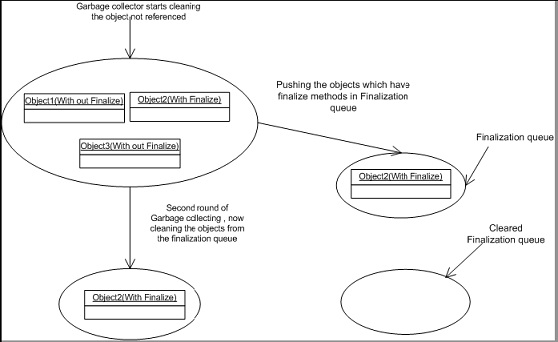
    Problem with finalize is that garbage collection has to make two rounds in order to remove objects which have finalize methods.
    Below figure will make things clear regarding the two rounds of garbage collection rounds performed for the objects having finalized methods.
    g1
    Figure: – Garbage collection in actions
    In this scenario there are three objects Object1, Object2, and Object3. Object2 has the finalize method overridden and remaining objects do not have the finalize method overridden.
    Now when garbage collector runs for the first time it searches for objects whose memory has to free. He can see three objects but only cleans the memory for Object1 and Object3. Object2 it pushes to the finalization queue.
    Now garbage collector runs for the second time. He see’s there are no objects to be released and then checks for the finalization queue and at this moment, it clears object2 from the memory.
    So if you notice that object2 was released from memory in the second round and not first. That is why the best practice is not to write clean up Non.NET resources in Finalize method rather use the DISPOSE.